Why Backlinks Can Hurt Your SEO
If you’ve been learning SEO, you’ve probably heard this a hundred times: “Backlinks are important.”
And yes — they are.
But here’s the part most people ignore…
Not all backlinks help your website. Some can actually damage your rankings.
That’s where understanding the backlink disavow tool becomes important.
What Are Backlinks? (Quick Recap)
Backlinks are simply links from other websites pointing to your site.
Think of them like votes of trust.
When a high-quality website links to you, search engines see it as a positive signal.
For example:
- A blog linking to your article
- A news site mentioning your brand
- A relevant niche website recommending your content
These are good backlinks — and they help improve your SEO.
Good vs Bad Backlinks
Not every link is created equal. Let’s keep it simple:
Good Backlinks:
- Come from trusted, high-authority websites
- Are relevant to your niche
- Use natural anchor text
- Drive real traffic
Bad (Toxic) Backlinks:
- Come from spammy or low-quality sites
- Are irrelevant to your content
- Are created using black-hat SEO tactics
- Look unnatural or automated
Google doesn’t just count links anymore — it evaluates their quality.
Why Toxic Backlinks Are Dangerous
Toxic backlinks can quietly harm your website without you even realizing it.
Here’s what they can do:
- Lower your search rankings
- Trigger algorithmic penalties
- Cause manual actions in Google Search Console
- Damage your website’s trust and authority
In some cases, competitors even create spam links to your site (negative SEO).
So even if you didn’t build bad links, you can still be affected.
That’s why ignoring toxic backlinks is risky.
What Is the Google Disavow Tool?
To solve this problem, Google provides a solution called the
This tool allows you to tell Google:
“I don’t trust these links. Please ignore them when evaluating my website.”
Instead of deleting links (which is often impossible), you simply disavow them.
This is where the backlink disavow tool plays a key role — it helps you protect your site from harmful link signals.
When You Should NOT Ignore Bad Links
Many beginners think:
“Google is smart, it will ignore bad links automatically.”
That’s partially true — but not always.
You should take action when:
- You see a sudden drop in rankings
- You receive a manual penalty warning
- Your backlink profile looks spammy
- You notice a large number of irrelevant links
- You’ve done low-quality link building in the past
In these situations, using a backlink disavow tool is not optional — it becomes necessary.
Backlinks are powerful — but only when they’re clean and relevant.
If your link profile is filled with spam or toxic links, it can hold your website back no matter how good your content is.
Understanding how to identify and handle these links — especially using the backlink disavow tool — is the first step toward building a strong, penalty-free SEO foundation.
2. What Are Toxic Backlinks? (Detailed Explanation)
Before you even think about using a backlink disavow tool, it’s important to clearly understand what toxic backlinks are and how they affect your website.
Many people make the mistake of calling every low-quality link “toxic.” But in reality, not every weak link is harmful. Toxic backlinks are those that actively send negative signals to Google and can damage your site’s trust, authority, and rankings.
What Are Toxic Backlinks?
Toxic backlinks are links that come from spammy, irrelevant, or manipulated sources. These links are usually created to trick search engines rather than provide value to users.
In simple words, if a backlink looks unnatural or exists only for SEO manipulation, it is likely toxic.
For example, if your website is about digital marketing and you suddenly get links from gambling, adult, or completely unrelated foreign-language websites, those links can be considered toxic. They don’t match your niche, and they don’t add any real value.
Why Toxic Backlinks Exist
Toxic backlinks don’t always happen by accident. There are a few common reasons behind them:
- You (or someone you hired) used low-quality link building services in the past
- Competitors created spam links to harm your rankings (negative SEO)
- Your website got listed automatically on spam directories or scraped sites
- Bots generated bulk backlinks without your control
This is why even good websites sometimes end up with a bad backlink profile.
Types of Toxic Backlinks (Explained Clearly)
To properly identify harmful links, you need to understand the common types.
1. Spam Directory Links
These are websites that exist only to list thousands of links without any real purpose. They usually have no traffic, poor design, and low-quality content.
If your website is listed on hundreds of such directories, it sends a weak and unnatural signal to Google.
2. Private Blog Network (PBN) Links
PBNs are networks of websites created only to build backlinks. They may look like real blogs, but they are controlled by one person or group.
These sites often have:
- Thin or copied content
- Similar design patterns
- Unnatural linking behavior
Google actively targets these networks, and links from them can be risky.
3. Irrelevant Backlinks
Relevance is a big factor in SEO. If your website is about technology and you get links from unrelated niches like health, fashion, or betting, those links lose value and can become suspicious.
A few irrelevant links are normal, but too many can indicate manipulation.
4. Paid Low-Quality Links
Buying backlinks is common, but the problem is buying cheap, bulk links from low-quality sources.
These links usually:
- Come from weak websites
- Have no real audience
- Are placed only for SEO purposes
Search engines can detect these patterns easily.
5. Comment Spam Links
These are links placed in blog comments just to get backlinks. They usually look like this:
“Great post! Check my website here…”
These links add no value and are often generated in large numbers using automation tools.
6. Auto-Generated Links
Some tools create hundreds or even thousands of backlinks automatically. These links often appear on random websites, forums, or pages with no real context.
This kind of link building is considered highly unnatural and can damage your SEO.
How Google Detects Toxic Backlinks
Google does not rely on a single factor. It analyzes multiple signals to understand whether your backlinks are natural or manipulative.
Using systems connected to platforms like Google Search Console, Google looks at:
- The quality and authority of linking domains
- Relevance between your site and the linking site
- Anchor text patterns (too many exact-match keywords can be suspicious)
- Link growth patterns (sudden spikes can be a red flag)
- Overall trust level of your backlink profile
Google’s algorithms are designed to either ignore low-quality links or, in serious cases, apply penalties.
When Do Toxic Backlinks Become a Real Problem?
Not every toxic link will hurt your website immediately. In many cases, Google simply ignores them.
However, they become a serious issue when:
- A large portion of your backlinks is low quality
- Your link profile looks unnatural or manipulated
- You receive a manual action warning
- Your rankings suddenly drop without any clear reason
In these situations, you need to take action instead of waiting.
Where the Disavow Tool Helps
When harmful links start affecting your website and you cannot remove them manually, you can use the
Google Disavow Tool
This tool allows you to submit a list of links that you want Google to ignore. Instead of deleting the links (which is often not possible), you simply tell Google not to consider them in ranking calculations.
This is an important step when you want to clean your backlink profile and protect your SEO performance.
Important Note: Don’t Overreact
One common mistake beginners make is trying to remove or disavow every low-quality link.
That approach can backfire.
Google is already good at ignoring many spam links automatically. You should only focus on links that are clearly harmful or part of a larger pattern.
Toxic backlinks are not just low-quality links — they are links that create negative signals and can damage your website’s credibility.
Understanding the difference between normal, weak, and truly harmful links is the foundation of using any backlink disavow strategy effectively.
3. Signs Your Website Has Bad Backlinks
Understanding toxic backlinks is important — but the real question is:
How do you know if your website is actually affected by them?
Many websites have a few low-quality links, and that’s normal. But when bad backlinks start growing or forming patterns, they begin to impact your SEO performance.
In this section, you’ll learn the clear signs that indicate your site may need cleanup using a backlink disavow tool.
Sudden Drop in Rankings
One of the most common signs is a sudden drop in your keyword rankings.
If your website was ranking well and then suddenly lost positions without any major changes in your content or website, bad backlinks could be one of the reasons.
This usually happens when:
- Google updates its algorithm
- Your backlink profile starts looking unnatural
- Spam links increase quickly
The drop may not always be instant, but a steady decline is also a warning sign.
Manual Action Warning in Google Search Console
A strong and clear signal comes from
Google Search Console
If Google finds unnatural links pointing to your site, it may issue a manual action.
You will see a notification like:
- “Unnatural links to your site”
- “Links violate Google guidelines”
This means your rankings are being affected directly, and you need to take action quickly.
In such cases, using the
Google Disavow Tool
becomes necessary.
Unnatural Anchor Text Pattern
Anchor text is the clickable text of a link.
A healthy backlink profile usually has:
- Brand name anchors
- Natural phrases
- Generic words like “click here”
But if you see too many backlinks using the same keyword (for example: “best SEO services” repeated hundreds of times), it looks manipulated.
This is a strong signal of spammy or paid link building.
Links From Irrelevant or Spammy Websites
If your backlink profile includes links from websites that have nothing to do with your niche, it’s a red flag.
For example:
- A tech blog getting links from gambling or adult sites
- A local business getting links from random foreign-language sites
These links don’t make sense contextually, and Google notices that.
Sudden Spike in Backlinks
A natural backlink profile grows slowly over time.
But if your website suddenly gets:
- Hundreds or thousands of backlinks in a short period
- Links from unknown or low-quality sources
…it can indicate:
- Spam link building
- Negative SEO attack
- Automated backlink generation
This type of growth looks unnatural to search engines.
Low-Quality Domains Linking to You
If most of your backlinks are coming from:
- Sites with no traffic
- Websites filled with ads or spam content
- Domains that look inactive or poorly built
…it reduces your overall link quality.
Even if each link is small, a large number of such links can create a negative effect.
High Spam Score or Toxicity Signals
Many SEO tools provide a spam score or toxicity indicator.
While these scores are not official Google metrics, they help you identify risky backlinks.
If your profile shows:
- High percentage of toxic links
- Increasing spam score over time
…it’s a sign that your backlink profile needs attention.
Drop in Organic Traffic
Sometimes rankings drop slowly, but traffic tells the real story.
If you notice:
- Fewer visitors from search engines
- Decline in impressions or clicks
- Lower visibility in search results
…it may be linked to backlink issues.
You can confirm this by checking your data in
Google Search Console
You Used Low-Quality Link Building in the Past
Be honest here.
If you have ever:
- Bought cheap backlinks
- Used automated tools
- Purchased bulk guest posts from low-quality sites
…then there is a high chance your backlink profile includes toxic links.
Even if those links helped short-term, they can cause problems later.
Competitor or Negative SEO Attack
Sometimes, the problem isn’t caused by you.
Competitors may try to harm your website by building spam links pointing to it. This is called negative SEO.
Signs include:
- Sudden increase in spam links
- Links from unrelated or harmful niches
- No clear reason for link growth
In such cases, monitoring your backlinks regularly is important.
When Should You Take Action?
You don’t need to panic if you notice one or two issues.
But you should take action when:
- Multiple warning signs appear together
- Rankings and traffic are clearly affected
- You receive a manual penalty
- Your backlink profile looks unnatural overall
At this stage, analyzing and cleaning your links — and possibly using a backlink disavow tool — becomes necessary.
Bad backlinks don’t always show obvious signs, but when they do, they usually affect rankings, traffic, and overall SEO performance.
By regularly checking your backlink profile and watching for these warning signs, you can take action early and protect your website from long-term damage.
4. Do You Really Need a Disavow Tool?
By now, you understand what toxic backlinks are and how to spot them.
The next important question is:
Do you actually need to use a backlink disavow tool?
The answer is not always “yes.”
Many website owners rush to disavow links without fully understanding when it’s necessary. This can sometimes do more harm than good.
What Google Says About Disavow
According to Google Search Console guidelines, Google is already capable of ignoring many low-quality or spammy backlinks automatically.
This means:
- Not every bad link will hurt your website
- Not every website needs to use the disavow feature
- In many cases, doing nothing is actually fine
That’s why the
Google Disavow Tool
is considered an advanced tool, not something beginners should use casually.
When You SHOULD Use a Backlink Disavow Tool
There are specific situations where using a backlink disavow tool becomes necessary.
1. You Received a Manual Action
If Google has sent you a warning about “unnatural links,” you must take action.
In this case:
- Remove as many bad links as possible manually
- Disavow the remaining ones
This is one of the clearest reasons to use the tool.
2. You Have a Large Number of Toxic Backlinks
If your backlink profile includes:
- Hundreds of spammy links
- Links from irrelevant or harmful niches
- Obvious link manipulation patterns
…then it’s safer to clean them up.
Ignoring a large volume of toxic links can affect your rankings over time.
3. You Did Low-Quality Link Building in the Past
If you have previously:
- Bought cheap backlinks
- Used automated link-building tools
- Purchased bulk guest posts from weak sites
…there is a high chance your profile contains harmful links.
Even if your rankings are stable now, these links can cause problems later.
4. Your Rankings Dropped Without Clear Reason
If your website:
- Lost rankings suddenly
- Experienced a steady decline
- Has no major technical or content issues
…then backlinks might be the issue.
In this case, analyzing your links and disavowing harmful ones can help recover performance.
5. Negative SEO Attack
If you notice:
- Sudden spike in spam backlinks
- Links from unrelated or suspicious websites
- No logical reason for link growth
…it could be a negative SEO attack.
Using a backlink disavow tool helps protect your site in such situations.
When You SHOULD NOT Use the Disavow Tool
This is just as important as knowing when to use it.
1. You Only Have a Few Bad Links
Every website naturally gets some low-quality links.
If the number is small and not affecting your performance, you can safely ignore them.
2. Your Rankings and Traffic Are Stable
If your website is performing well, there is no need to take unnecessary risks.
Disavowing links without a clear reason can remove signals that are actually helping your SEO.
3. You’re Not Sure Which Links Are Harmful
If you cannot clearly identify toxic links, it’s better to wait and analyze more.
Wrong disavow decisions can:
- Remove good backlinks
- Reduce your authority
- Hurt your rankings
4. You Expect Instant Results
The disavow process is not a quick fix.
Even after using the
Google Disavow Tool
it can take weeks or even months to see any impact.
If you’re looking for fast results, this is not the right approach.
Difference Between Removing and Disavowing Links
It’s important to understand the difference between these two actions.
Removing Links (Manual Process):
- Contact website owners
- Request link removal
- More effective but time-consuming
Disavowing Links:
- You tell Google to ignore links
- Faster and easier
- Does not remove the link from the internet
Best practice is:
First try to remove links manually, then disavow the remaining ones.
How to Use the Disavow Tool Safely
If you decide to use a backlink disavow tool, keep these points in mind:
- Focus only on clearly harmful links
- Avoid disavowing entire domains unless necessary
- Double-check your list before uploading
- Keep your file updated over time
Using the tool carefully is more important than using it quickly.
The backlink disavow tool is powerful, but it’s not something you should use blindly.
In many cases, Google handles bad links on its own. But when your backlink profile becomes risky or your rankings are affected, this tool becomes an important part of your SEO strategy.
The key is simple:
Use it only when there is a real problem, and use it carefully.
5. What Is the Backlink Disavow Tool?

Now that you know when you should (and shouldn’t) use it, let’s understand the tool itself in a clear and practical way.
The backlink disavow tool is not a typical SEO tool like keyword research or backlink analysis tools. It’s a very specific feature designed to solve one problem:
Ignoring harmful backlinks that you cannot remove manually.
Simple Definition
The backlink disavow tool allows you to tell Google:
“I don’t want these backlinks to be considered when ranking my website.”
Instead of deleting links (which is usually not in your control), you simply submit a list of URLs or domains that you want Google to ignore.
This feature is provided through
Google Disavow Tool
Why This Tool Exists
In the past, backlinks were one of the strongest ranking factors. Because of that, many people started manipulating rankings by building large numbers of low-quality links.
To control this, Google introduced penalties for unnatural links.
But there was a problem:
What if bad links were created without your control?
- Old SEO work done incorrectly
- Spam links generated automatically
- Negative SEO attacks from competitors
Website owners needed a way to protect themselves. That’s why Google introduced the disavow feature.
How the Disavow Tool Works
The process is simple, but the impact is important.
Here’s what happens:
- You create a file listing harmful backlinks
- You upload it through the disavow tool
- Google processes the file
- Those links are ignored in ranking calculations
Important point:
Google does not remove the links. It just stops counting them.
URL vs Domain Disavow
When using a backlink disavow tool, you have two options:
Disavow Specific URLs
You can target individual pages.
Example:
This is useful when:
- Only a few pages on a site are harmful
- The domain itself is not completely spammy
Disavow Entire Domain
You can block all links from a domain.
Example:
This is useful when:
- The entire website is low-quality
- You are dealing with spam networks
- You want to save time instead of listing multiple URLs
File Format and Requirements
The disavow file is very simple, but it must follow specific rules:
- File format:
.txt - Encoding: UTF-8
- One URL or domain per line
- Use
domain:before domain-level entries
You can also add comments using # to keep notes.
Example:
domain:spamdirectory.com# individual bad link
https://example.com/bad-link
Is This the Best Backlink Disavow Tool?
When people search for the “best backlink disavow tool,” they usually mean tools that help create or manage disavow files.
But the actual disavow action always happens through
Google Disavow Tool
Other tools simply help you:
- Analyze backlinks
- Identify toxic links
- Generate disavow files
Free vs Paid Disavow Tools
You don’t need to pay to disavow backlinks.
- Google’s disavow tool is completely free
- Many tools offer free disavow file generators
- Paid SEO tools provide deeper analysis and automation
So when you see “backlink disavow tool free,” it usually refers to tools that help prepare the file — not the actual submission process.
Important Limitations
Before using the backlink disavow tool, you should understand its limitations:
- It does not remove links from the internet
- It does not guarantee ranking improvement
- It takes time for Google to process changes
- Wrong usage can harm your SEO
That’s why this tool should be used carefully and only when needed.
The backlink disavow tool is a safety mechanism, not a growth tool.
It won’t boost your rankings directly, but it can protect your website from damage caused by harmful backlinks.
If used correctly, it helps clean your backlink profile and gives your site a better chance to perform based on its real quality.
6. How to Access Google Disavow Tool (Step-by-Step)
Now that you understand what the backlink disavow tool is and how it works, the next step is learning how to access it properly.
One important thing to know:
You won’t find the disavow tool directly inside the main dashboard of
Google Search Console
It’s a separate page, and many beginners struggle to find it.
Step 1: Log in to Google Search Console
First, go to
Google Search Console
- Log in using your Google account
- Make sure your website is already added and verified
- Select the correct property (your domain or URL property)
If your website is not verified, you won’t be able to use the disavow feature.
Step 2: Open the Disavow Tool Page
The disavow tool is not visible in the normal menu.
You need to access it directly through
Google Disavow Tool
Once you open it:
- You’ll see a simple interface
- It will ask you to select your website property
This step is often referred to as “Google disavow tool login”
Step 3: Select the Correct Website Property
If you manage multiple websites, be careful here.
- Choose the exact domain you want to work on
- Make sure it matches the property in Search Console
- Double-check before moving forward
Selecting the wrong property means your disavow file won’t apply to the correct website.
Step 4: Understand the Warning Message
Before you upload anything, Google will show you a warning.
It usually says that:
- This is an advanced feature
- Incorrect use can harm your site
- You should only use it if necessary
This is normal. Google shows this message to prevent misuse.
Just continue if you are sure about your action.
Step 5: Download Existing Disavow File (If Any)
If you have used the tool before, you’ll see an option to download your current file.
This is important because:
- You cannot “edit” the file directly
- You need to download, update, and re-upload it
Always keep a backup of your previous file before making changes.
Step 6: Prepare Your New Disavow File
Before uploading, make sure:
- Your file is in
.txtformat - It follows the correct structure
- You have reviewed all links carefully
If you’re unsure how to create the file, the next section will explain it step by step.
Step 7: Upload the Disavow File
Once your file is ready:
- Click on “Upload”
- Select your
.txtfile - Submit it
After submission, you’ll see a confirmation message.
Step 8: Wait for Processing
The disavow process is not instant.
Google needs time to:
- Re-crawl the links
- Process your file
- Update your link signals
This can take:
- A few weeks in most cases
- Sometimes longer depending on your site
Common Mistakes While Accessing the Tool
Many users face issues because of small mistakes:
- Using the wrong Google account
- Selecting the wrong property
- Uploading the wrong file
- Not checking existing disavow data
Avoid these errors to ensure the process works correctly.
Accessing the backlink disavow tool is simple once you know where to find it. The real challenge is not opening the tool — it’s using it correctly.
Make sure your website is verified, your file is accurate, and you fully understand what you are uploading.
7. How to Find Toxic Backlinks (Complete Process)
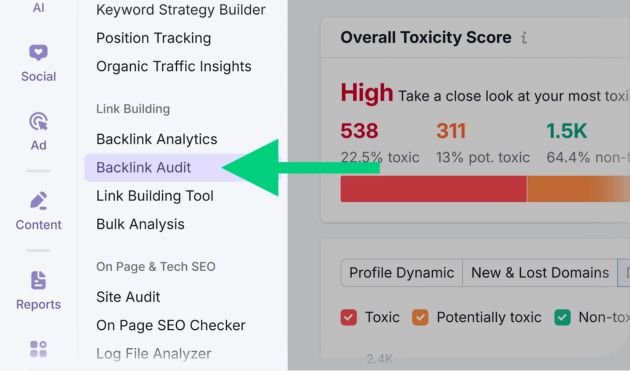
Before you use any backlink disavow tool, the most important step is identifying which links are actually harmful. If you skip this step or do it carelessly, you might end up disavowing good backlinks, which can negatively affect your SEO.
This section will show you a simple, practical process to find toxic backlinks using reliable methods and tools.
Step 1: Collect Your Full Backlink Data
The first step is to gather all backlinks pointing to your website.
You can start with
Google Search Console
Inside Search Console:
- Go to the “Links” section
- Export external links report
- Download all sample links
This gives you a basic but important backlink list directly from Google.
However, this is not always enough for deep analysis.
Step 2: Use SEO Tools for Deeper Backlink Analysis
To get a complete picture, you need professional SEO tools that show more detailed backlink data.
Common tools include:
- Ahrefs
- SEMrush
- Moz
These tools help you:
- Find more backlinks than Google shows
- Check domain authority and trust signals
- Identify spammy or suspicious websites
- Analyze anchor text patterns
Step 3: Check Domain Quality
Not all backlinks are equal. You need to evaluate the quality of each domain.
Look at these signals:
- Does the website have real traffic?
- Is the content original or spammy?
- Is the site related to your niche?
- Does it look trustworthy or outdated?
If a site looks low quality or irrelevant, its backlinks may be toxic.
Step 4: Analyze Anchor Text Patterns
Anchor text plays a big role in identifying unnatural links.
A natural backlink profile includes:
- Brand name mentions
- Generic phrases like “click here”
- Natural contextual links
But warning signs include:
- Too many exact-match keywords
- Repeated commercial anchors
- Over-optimized SEO phrases
If you see patterns like this across many links, it may indicate manipulation.
Step 5: Identify Spam Signals
Some backlinks clearly show spam behavior. Watch for:
- Websites filled with ads and no real content
- Foreign-language sites unrelated to your niche
- Pages with hundreds of outgoing links
- Auto-generated or scraped content
These are strong indicators of toxic backlinks.
Step 6: Check Link Relevance
Relevance is one of the most important SEO factors.
Ask yourself:
- Does this website match my industry?
- Would a real user click this link naturally?
- Does the content connect to my topic?
If the answer is “no,” the link may not be valuable.
Step 7: Look for Sudden Link Spikes
A healthy backlink profile grows slowly over time.
If you notice:
- Hundreds of links appearing in a short time
- Unusual growth from unknown domains
- Repetitive link patterns
This could indicate spam link building or negative SEO activity.
Step 8: Mark Toxic Links for Review
Once you identify suspicious backlinks:
- Add them to a separate list
- Group them by domain
- Double-check before final decision
Do not rush this step. Careful review is important before using any backlink disavow tool.
When a Link Should Be Considered Toxic
A backlink is usually toxic when:
- It comes from a spam or irrelevant site
- It shows unnatural linking behavior
- It is part of a paid or automated link scheme
- It adds no real value or context
One or two weak links are not a problem. The issue is patterns, not individual links.
Finding toxic backlinks is not about guessing — it’s about analyzing patterns, quality, and relevance.
If you use tools like
Ahrefs,
SEMrush,
and data from
Google Search Console
you can accurately identify harmful links and prepare a clean list for disavow.
8. How to Create a Disavow File (Step-by-Step)
Once you have identified toxic backlinks, the next step is to organize them into a proper disavow file. This file is what you upload to the backlink disavow tool, so formatting is very important.
Even a small mistake in the file can make it invalid or reduce its effectiveness.
What Is a Disavow File?
A disavow file is a simple text file where you list:
- Bad URLs (specific pages)
- Or entire domains (recommended in most cases)
You submit this file to
Google Disavow Tool
so Google ignores those links when evaluating your website.
Step 1: Use the Correct File Format
Your file must be:
- Plain text format
- Saved as
.txt - UTF-8 encoding (recommended)
You cannot use:
- Word files (.docx)
- Excel sheets
- PDF files
Only .txt files work.
Step 2: Understand File Structure
The structure is very simple.
You can add:
- One URL per line
- Or one domain per line
Example format:
https://spamwebsite.com/bad-page# blocking entire domain
domain:spamwebsite.com
Anything after # is treated as a comment and ignored by Google. It is only for your reference.
Step 3: Decide Between URL and Domain Disavow
You have two options:
Option 1: Disavow Specific URLs
Use this when only certain pages are harmful.
Example:
This is useful when:
- The domain is mostly good
- Only a few pages are toxic
Option 2: Disavow Entire Domain
This is the most commonly used method.
Example:
Use this when:
- The entire website is spammy
- It has no value or trust
- You see multiple bad links from the same domain
This method is faster and cleaner for bulk spam.
Step 4: Organize Your File Properly
Before uploading, make sure:
- Each entry is on a new line
- No duplicate URLs are included
- You only include confirmed toxic links
- You double-check domain spelling
A clean file reduces risk of mistakes.
Step 5: Example Disavow File
Here is a simple example:
domain:spamdirectory.com
domain:free-backlinks-site.com# individual toxic pages
https://example.com/spam-page1
https://example.com/bad-article
This structure is clean, readable, and safe.
Step 6: Common Mistakes to Avoid
Many beginners make mistakes when creating a disavow file:
1. Adding Good Links by Mistake
This is the most dangerous mistake.
Removing good backlinks can harm your rankings.
2. Using Wrong Format
If you forget:
domain:prefix.txtfile format- Proper line structure
Google may ignore your file.
3. Over-Disavowing Everything
Some users disavow hundreds of links without proper analysis. This is not recommended.
Only include links that are clearly harmful.
4. Not Updating Old Files
If you already uploaded a file before, always:
- Download old file
- Merge new updates
- Re-upload the full version
You cannot “edit” the file inside Google directly.
Step 7: Save and Prepare for Upload
Once your file is ready:
- Save it as
disavow.txt - Keep a backup on your computer
- Review everything one final time
Then you are ready to upload it in the next step using the backlink disavow tool.
A disavow file is simple in structure but very powerful in impact.
If you build it carefully, it helps clean your backlink profile and protects your site from harmful SEO signals. But if you make mistakes, it can affect your rankings negatively.
That’s why accuracy is more important than speed.
9. Using a Free Backlink Disavow Tool (Easy Method)
Creating a disavow file manually is useful, but it can take time—especially if you are dealing with hundreds or thousands of backlinks. That’s where a free backlink disavow tool becomes helpful.
These tools don’t replace Google’s system. Instead, they help you prepare a clean disavow file quickly and correctly.
One of the popular tools for this process is:
All SEO Tools Backlink Disavow Tool
What a Free Backlink Disavow Tool Does
A free disavow tool mainly helps you:
- Convert raw backlink lists into proper disavow format
- Separate URLs and domains automatically
- Reduce manual formatting work
- Prevent common file structure mistakes
In simple words, it makes the process faster and easier, especially for beginners.
Step-by-Step: How to Use a Free Disavow Tool
Step 1: Collect Your Backlinks
First, gather your backlinks from:
- Google Search Console
- SEO tools like Ahrefs or SEMrush
Make sure your list includes all suspicious and toxic links.
Step 2: Paste Links into the Tool
Open the disavow generator tool and:
- Paste your backlink list
- Or upload your exported file (if supported)
The tool will start analyzing the links.
Step 3: Select Disavow Type
Most tools give you options like:
- Disavow URL
- Disavow domain
Choose based on your strategy:
- URL level for specific spam pages
- Domain level for entire spam websites
Step 4: Generate Disavow File
The tool will automatically:
- Format links correctly
- Add
domain:where needed - Structure everything into
.txtformat
This removes the risk of manual formatting errors.
Step 5: Download the File
Once generated:
- Download the
.txtfile - Save it on your computer
- Double-check the content quickly
Now your file is ready for upload.
Why People Use Free Disavow Tools
Many users prefer these tools because:
- They save time
- They reduce human error
- They are beginner-friendly
- They simplify bulk backlink handling
If you are working with large SEO projects, this can be very helpful.
Important Limitations of Free Tools
Even though free disavow tools are useful, they have limitations:
- They do not decide which links are actually toxic
- They cannot replace proper backlink analysis
- They may not always detect complex spam patterns
- You still need SEO knowledge to choose links correctly
So remember: the tool helps with formatting, not decision-making.
Best Practice Workflow
A safe and professional workflow looks like this:
- Collect backlinks from multiple sources
- Analyze and mark toxic links manually
- Use a free disavow tool to format the list
- Review the final file carefully
- Upload it to
- Google Disavow Tool
A free backlink disavow tool is not mandatory, but it makes the process much easier—especially for beginners or large backlink profiles.
However, the most important step is still analysis. The tool should support your decision, not replace it.
If used correctly, it helps you create clean, structured disavow files quickly and safely.
10. How to Upload Disavow File to Google (Step-by-Step)
After creating your disavow file, the next step is uploading it to Google so the selected backlinks are ignored.
This process is done through the official system provided by
Google Disavow Tool
and it works directly with your website data inside
Google Search Console
It’s a simple process, but it must be done carefully because one wrong upload can affect your SEO results.
Step 1: Open Google Search Console
First, log in to
Google Search Console
- Select the correct website property
- Make sure you are using the same domain where backlinks exist
- Verify that the site is fully connected
Without verification, you cannot proceed.
Step 2: Go to the Disavow Tool Page
The disavow option is not inside the normal menu.
You need to open it directly using the Google Disavow Tool
Once opened:
- Select your website
- Confirm property access
- Proceed to the upload section
Step 3: Check Existing Disavow File (Very Important)
Before uploading a new file, always check if an old file already exists.
If yes:
- Download the existing file
- Review all previous entries
- Merge old + new links into one file
Google does not replace individual entries—you always upload a complete updated file.
Step 4: Prepare Your Final File
Make sure your file is ready and:
- Saved in
.txtformat - Properly structured
- Contains only confirmed toxic links
- Does not include good backlinks by mistake
A clean file is critical for safe SEO results.
Step 5: Upload the Disavow File
Now upload your file:
- Click the “Upload” button
- Select your
.txtfile - Confirm submission
Once uploaded, Google will show a confirmation message that your file has been processed.
Step 6: Wait for Google to Process It
This is very important to understand:
Uploading is not instant impact.
After submission:
- Google will recrawl backlinks
- It will gradually ignore disavowed links
- Changes take time to reflect in rankings
Usually:
- Few weeks for small websites
- Longer for large websites
Step 7: Monitor Results in Google Search Console
After uploading, you should monitor your website performance in
Google Search Console
Watch for:
- Changes in organic traffic
- Improvement in keyword rankings
- Reduction in spam link signals
But remember, results are gradual—not immediate.
Common Mistakes During Upload
Many users make avoidable mistakes during this step:
1. Uploading Wrong File
Uploading an incomplete or incorrect file can reduce SEO performance.
2. Forgetting Old Disavow Data
If you don’t include previous entries, they will be removed from the system.
3. Expecting Instant Ranking Recovery
Disavow is not a quick fix. It works slowly over time.
4. Disavowing Too Many Links
Removing too many links can weaken your backlink profile instead of improving it.
Uploading a disavow file is simple technically, but strategically it is very important.
When done correctly, it helps clean your backlink profile and protects your website from harmful SEO signals. But it should always be used carefully, with proper analysis and patience.
11. What Happens After Disavowing Links?
After you upload your disavow file through the backlink disavow tool, many people expect immediate improvements in rankings. But in reality, the process works more gradually.
Google does not instantly remove the effect of backlinks. Instead, it slowly reprocesses your link profile over time.
This section explains what actually happens after you submit your file to
Google Disavow Tool
1. Google Starts Re-Crawling Your Backlinks
Once your file is uploaded, Google begins re-evaluating the links pointing to your website.
Through systems connected with
Google Search Console
Google:
- Re-crawls linking pages
- Re-checks backlink signals
- Updates its understanding of your link profile
This process is not instant and depends on how often Google crawls those websites.
2. Disavowed Links Are Ignored (Not Removed)
One important point many people misunderstand is:
The links are not deleted from the internet.
Instead:
- Google simply ignores them
- They no longer pass ranking signals
- They are excluded from SEO calculations
So your backlink profile becomes cleaner in Google’s evaluation system.
3. Ranking Changes Happen Slowly
After disavowing toxic backlinks, you may notice changes in rankings, but they do not happen immediately.
Possible outcomes:
- Slight improvement in a few weeks
- Gradual recovery over 1–3 months
- No visible change if links were already ignored
The speed depends on:
- Size of your website
- Severity of toxic backlinks
- How often Google updates your pages
4. Traffic Fluctuations Are Normal
During the processing period, you might see:
- Small drops in traffic
- Temporary ranking instability
- Fluctuations in keyword positions
This is normal because Google is updating its understanding of your backlink profile.
It does not always mean something is wrong.
5. No Guaranteed Ranking Boost
One important reality check:
Using a backlink disavow tool does not guarantee ranking improvement.
It only removes harmful signals.
So the results depend on:
- Whether toxic links were actually affecting your site
- How strong your remaining backlink profile is
- Overall SEO quality (content + technical + authority)
If your site already has strong SEO, you may see little change.
6. Google May Already Ignore Some Links
In many cases, Google already ignores spammy backlinks automatically.
That means:
- Some disavowed links had no real impact anyway
- Your rankings may not change much after cleanup
- The tool acts more like a safety measure
This is why disavow is considered an advanced SEO action, not a routine fix.
7. Monitoring Is Very Important After Disavow
After submitting your file, you should regularly monitor your website using
Google Search Console
Check:
- Organic traffic trends
- Index coverage
- Manual actions (if any)
- Keyword performance changes
This helps you understand whether your disavow strategy is working.
After using the disavow tool, nothing happens instantly. Instead, Google slowly updates its understanding of your backlink profile.
The key idea is simple:
Toxic links stop influencing rankings
Your site gets a cleaner link profile
Improvements take time, not days
Patience is very important in this process.
12. Common Mistakes to Avoid When Using the Disavow Tool
Using the backlink disavow tool can be very effective, but only when it is done correctly. Many website owners make small mistakes that later cause big SEO problems.
This section will help you avoid those mistakes so you can safely manage your backlink profile.
1. Disavowing Good Backlinks by Mistake
This is the most dangerous mistake.
Sometimes people:
- Misjudge a link as toxic
- Include strong backlinks in the disavow file
- Remove links that are actually helping rankings
When you disavow good backlinks, you reduce your website’s authority instead of improving it.
That’s why every link must be carefully reviewed before adding it to the file used in
Google Disavow Tool
2. Using the Tool Without Proper Analysis
Many beginners rush into disavowing links without deep analysis.
They:
- Export backlinks
- Mark everything low-quality
- Upload large disavow files
This approach is risky.
You should always analyze backlinks using data from
Google Search Console
and other SEO tools before taking action.
3. Disavowing Too Many Links at Once
More is not always better.
If you disavow too many links:
- You may remove natural backlink signals
- Your domain authority may drop
- Google may lose trust signals about your site
Only include links that are clearly harmful or part of spam patterns.
4. Ignoring Domain-Level Strategy
Some users only disavow individual URLs when they should block the entire domain.
For example:
- If a website is fully spammy, URL-level disavow is not enough
- You should use domain-level disavow like
domain:example.com
Not using the right method can reduce effectiveness.
5. Not Updating Old Disavow Files
One of the most common technical mistakes is forgetting that:
Google does not merge files automatically.
If you upload a new file:
- It replaces the old one
- Previous entries may get removed
So always:
- Download existing file
- Combine old + new entries
- Re-upload complete list
6. Expecting Instant SEO Results
Many people think:
- “I disavowed links, so rankings will improve immediately”
But that’s not how it works.
After using the tool, Google needs time to:
- Re-crawl pages
- Recalculate signals
- Update rankings
This process can take weeks or months.
7. Using Disavow Instead of Fixing the Root Problem
Disavow is not a replacement for real SEO improvement.
Some people:
- Ignore content quality
- Ignore technical SEO issues
- Only focus on backlinks
But SEO problems often come from multiple sources, not just backlinks.
8. Not Monitoring After Submission
After uploading your file to Google Disavow Tool
you must monitor performance.
If you don’t track changes, you won’t know:
- Whether toxic links were affecting your site
- Whether rankings improved
- Whether you need further action
Always monitor using Google Search Console
13. Advanced Disavow Strategies (Pro Level SEO Approach)
Once you understand the basics of the backlink disavow tool, the next step is learning how professionals handle backlink cleanup in a smarter and more strategic way.
At this level, the goal is not just removing bad links — but protecting long-term SEO stability and improving overall link quality.
1. Focus on Patterns, Not Individual Links
Beginners often analyze backlinks one by one. Professionals don’t.
Instead, they look for patterns such as:
- Same type of spam domains repeatedly linking
- Similar anchor text across multiple links
- Sudden spikes from identical sources
If a pattern is clear, it usually means the entire source is toxic — not just one URL.
This helps in making better decisions before uploading anything to
Google Disavow Tool
2. Prefer Domain-Level Disavow Over URL-Level
At advanced level, SEO experts prefer using:
domain:example.com
instead of individual URLs.
Why?
- It saves time
- It blocks entire spam networks
- It reduces future cleanup work
URL-level disavow is only used when a domain is mostly good but has a few bad pages.
3. Combine Manual Removal + Disavow Strategy
A strong backlink cleanup strategy always includes two steps:
Step 1: Manual Removal
- Contact website owners
- Request link removal
- Clean as many links as possible
Step 2: Disavow Remaining Links
- Use the backlink disavow tool
- Submit only links that cannot be removed manually
This hybrid approach is safer and more effective.
4. Handle Negative SEO Attacks Properly
Sometimes, backlinks are not created by you at all.
Competitors may try to harm your website by building spam links. This is known as negative SEO.
Signs include:
- Sudden influx of low-quality backlinks
- Irrelevant foreign websites linking to your pages
- No clear reason for link growth
In such cases:
- Do not panic
- Analyze carefully using
Google Search Console - Disavow only confirmed toxic domains
5. Regular Backlink Audits (Ongoing Strategy)
Advanced SEO is not a one-time process.
Professionals perform backlink audits:
- Monthly for large websites
- Quarterly for small websites
They use tools like:
The goal is to detect problems early before rankings drop.
6. Keep a Clean Disavow History
Many beginners forget old disavow files, but professionals always maintain:
- A master disavow file
- Version history backups
- Regular updates
Every time a new file is uploaded in
Google Disavow Tool
it replaces the previous one.
So maintaining structure is very important.
7. Don’t Over-Optimize Backlink Cleanup
Advanced users know one important rule:
Less is more.
They avoid:
- Over-disavowing borderline links
- Removing links without clear evidence
- Reacting emotionally to ranking drops
Instead, they make data-driven decisions.
8. Combine Disavow With Overall SEO Strategy
Disavowing links alone is not enough.
Professional SEO also includes:
- High-quality content creation
- Strong internal linking
- Technical SEO improvements
- Natural link building
A clean backlink profile only supports SEO — it does not replace it.
14. How Often Should You Use the Disavow Tool?
One of the most common questions in SEO is how often you should use the backlink disavow tool. The answer is simple: it depends on your website type, backlink profile, and how fast new links are created.
Using it too often or too rarely can both create problems, so timing is very important.
1. For New Websites
New websites usually do not need frequent disavow work.
In most cases:
- There are fewer backlinks
- Google is still building trust signals
- Spam links may not have strong impact yet
You should only use the tool if:
- You see clear spam backlinks
- There is a sudden suspicious link attack
- Google Search Console shows obvious toxic domains
At this stage, focus more on building quality content and natural links rather than heavy disavow work.
Use data from
Google Search Console
to monitor early backlink growth.
2. For Established Websites
For older websites with consistent traffic, disavow should be done periodically.
Recommended frequency:
- Every 3 to 6 months
During these audits, you should:
- Export all new backlinks
- Identify spam or irrelevant domains
- Update your disavow file if needed
This helps keep your backlink profile clean without overusing the tool.
3. For High-Traffic or Authority Websites
Large websites often attract:
- Spam bots
- Scraper sites
- Negative SEO attempts
For these websites:
- Monthly monitoring is ideal
- Quarterly disavow updates are usually enough
However, action should only be taken when necessary — not automatically every month.
4. When You Should Immediately Use the Tool
There are situations where you should not wait for scheduled audits:
- Sudden drop in rankings
- Massive spike in low-quality backlinks
- Manual action warning in
Google Search Console - Clear spam attack from unrelated domains
In these cases, quick action using the backlink disavow tool is important.
5. Avoid Overusing the Tool
Using the tool too frequently can cause problems such as:
- Removing useful backlinks by mistake
- Confusing Google signals
- Slowing down SEO recovery
Remember, Google already ignores many spam links automatically. So manual disavow is only needed when there is clear evidence of harm.
6. Build a Healthy Monitoring Routine
Instead of focusing only on disavow, create a routine like this:
- Weekly: Check new backlinks in Search Console
- Monthly: Review link quality trends
- Quarterly: Full backlink audit
- Only then: Update disavow file if needed
This keeps your SEO stable and controlled.
15. Real-World Examples: How Toxic Backlinks Affect SEO and How Disavow Helps
To understand the real value of the backlink disavow tool, it is important to see how toxic backlinks actually impact websites in real situations.
Below are simple, real-world style examples that show what happens before and after using disavow correctly.
1. Example: Sudden Spam Backlink Attack
A small business website suddenly notices:
- Hundreds of backlinks from unrelated foreign websites
- Random anchor texts like “casino”, “loan”, or “adult content”
- No real reason for these links to exist
After checking in
Google Search Console
the owner realizes it is a spam attack.
What happens next:
- Website starts losing keyword rankings
- Traffic becomes unstable
- Google starts ignoring some signals due to unnatural link profile
Solution:
The website owner:
- Identifies toxic domains
- Uses the backlink disavow tool
- Submits a clean disavow file
After some time:
- Spam links stop affecting SEO signals
- Rankings slowly stabilize
2. Example: Low-Quality SEO Package Links
A blog owner buys a cheap SEO package that includes:
- 500 directory links
- Forum profile links
- Auto-generated blog comments
At first, rankings slightly increase, but later:
- Pages drop in Google results
- Bounce rate increases
- Organic traffic decreases
When analyzed, most links are:
- Irrelevant
- Low authority
- Clearly unnatural
Solution:
- Remove what can be manually deleted
- Disavow remaining spam domains using
Google Disavow Tool
Result:
- Google starts re-evaluating link signals
- Rankings gradually recover after reprocessing
3. Example: Competitor Negative SEO
An e-commerce website experiences:
- Sudden drop in rankings for main keywords
- Spike in backlinks from unrelated websites
- Links with spammy anchor text pointing to product pages
No SEO work was done by the owner, so suspicion rises.
After investigation in
Google Search Console
it becomes clear it is a negative SEO attempt.
Solution:
- Carefully identify toxic domains
- Avoid disavowing good links by mistake
- Upload targeted disavow file
Outcome:
- Google ignores harmful links
- Website regains stability over time
4. Example: Old Website with Forgotten Spam Links
A 5-year-old blog had:
- Old backlinks from outdated web directories
- Forum spam links from years ago
- No backlink cleanup history
Even though content was good, rankings were not improving.
Solution:
- Full backlink audit
- Cleanup using backlink disavow tool
- Focus on removing domain-level spam
After cleanup:
- Search visibility improves
- New content ranks faster
- Domain trust increases
Key Lesson From All Examples
Across all cases, one thing is clear:
Toxic backlinks do not always crash your website instantly, but they slowly damage trust signals and ranking stability.
Using the backlink disavow tool correctly helps:
- Protect long-term SEO health
- Remove harmful link signals
- Support recovery after spam or attacks
16. Conclusion
Managing backlinks is one of the most important parts of SEO. Your rankings do not depend only on content or keywords, but also on the quality of websites linking to you.
The backlink disavow tool plays a key role when your backlink profile becomes risky or polluted with spam links.
1. Key Takeaways from This Guide
Let’s quickly summarize what you learned:
- Backlinks can help or harm your SEO depending on quality
- Toxic backlinks can reduce trust and rankings over time
- Google often ignores spam, but not always in severe cases
- The disavow tool is used only when necessary
- Proper analysis is more important than quick action
2. When to Use the Disavow Tool
You should use the tool only when:
- You see clear spam or unnatural backlinks
- Your site is affected by negative SEO
- You receive manual action warnings
- There is a sudden, unnatural spike in bad links
Always confirm issues using
Google Search Console
before taking action.
3. Smart SEO Approach (Best Practice)
A strong backlink strategy is not just about removing bad links. It is about building a healthy link profile.
Best approach includes:
- Regular backlink monitoring
- Removing or disavowing only harmful domains
- Building high-quality natural backlinks
- Avoiding spammy SEO shortcuts
When needed, you can use the
Google Disavow Tool
carefully as part of a bigger SEO plan.
4. Final Advice
Many beginners overuse the disavow tool and harm their SEO unintentionally. Professionals do the opposite — they use it rarely, but very strategically.
The main rule is simple:
Do not disavow everything you don’t like. Only disavow what is clearly harmful.